
By kodewright · Published: 2026-10-11
ATS Keyword Optimization: Match Your Resume for Free
Find the phrases a job post repeats, see which ones your resume is missing, and add them honestly. A free method that needs no paid ATS scanner.
ATS keyword optimization means describing your experience with the same phrases the job post uses, because recruiters find candidates in an applicant tracking system by searching for those phrases. You can do it for free: list the two-word phrases the job post repeats most, check which ones your resume is missing, and add the ones that are true for you.
Below is the method I use with my own Keyword Density Checker, a worked example, and the places where a simple word counter will mislead you if you don't know how it splits words.
What an ATS does with your keywords
An applicant tracking system (Workday, Greenhouse, Lever, iCIMS and many others) reads your resume, pulls out the text, and files it into a candidate profile. A recruiter then searches and filters those profiles: "email marketing", "Google Analytics", "project management". Some systems also show a match score against the job post. How exactly that score is calculated differs between vendors and between companies using the same vendor, and I can't see inside any of them.
What's consistent is this: if a phrase isn't in your resume text, a search for it won't find you, no matter how relevant your experience is. That's the whole problem this method fixes. It's a vocabulary problem much more often than an experience problem.
I've been on the hiring side of resume screening, and the person searching the system is usually not the person who wrote the job post. They search for the words in front of them, which are the words in the post.
The method in five steps
- Open the Keyword Density Checker, set Phrase length to 2 words and leave "Exclude common words" on. Paste the full job description. The checker runs in your browser and nothing you paste is sent anywhere, so it's fine to use with a resume that has your phone number and address on it.
- Read the top of the list. Those are the employer's own terms, ranked by how often they repeat them. A phrase that shows up three times in a 150-word post is not an accident.
- Clear the box and paste your resume, with the same settings.
- Compare the two lists. Every phrase near the top of the job-post list that's missing from your resume list is a gap.
- Rewrite the lines where you did that work so they use the job post's phrase, then paste the resume again to confirm the phrase now appears.
Switch to 1 word once as well. Tool and platform names (HubSpot, Salesforce, Figma, Python) are usually single words, and a two-word list only shows them stuck to whatever word happens to sit next to them.
I rewrite my CV this way for every application. It takes a few minutes once you've done it twice, and the job post basically gives you the vocabulary.
A worked example
To show what the gaps look like, I wrote a sample job post for a marketing coordinator (158 words) and a short sample resume for someone who has done most of that job under a different title. Both are made up for this article. I ran them through the same counting logic the checker uses, with two-word phrases and common words excluded.
| Phrase from the job post | Times in job post | In original resume | In rewritten resume |
|---|---|---|---|
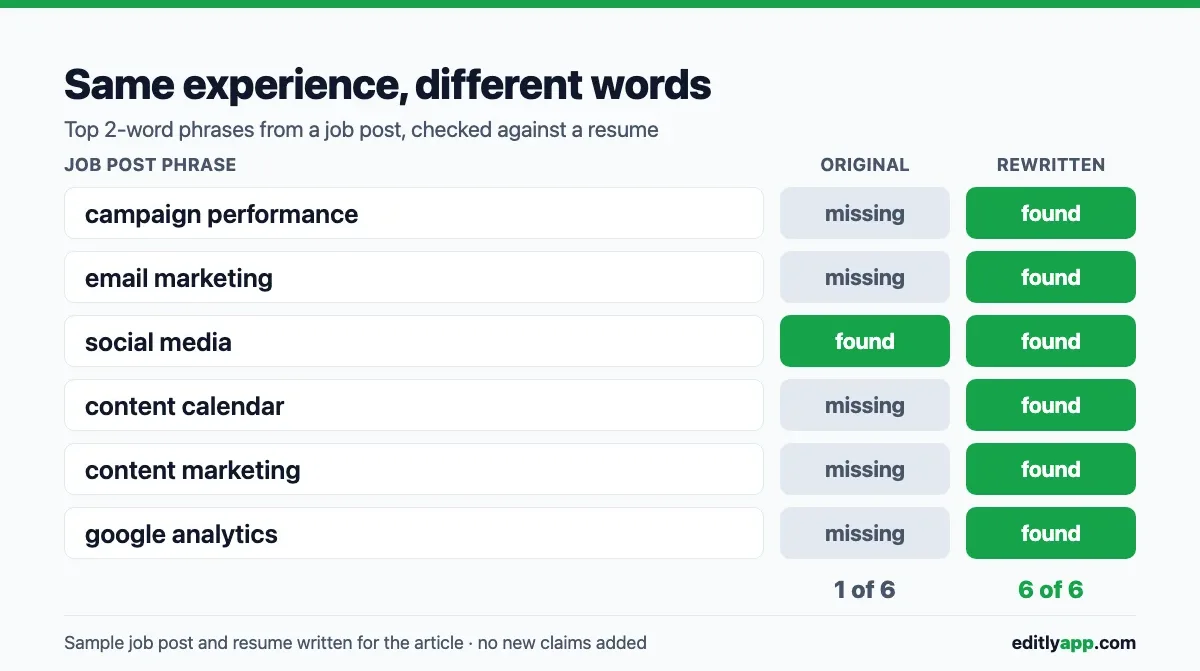
| campaign performance | 3 | 0 | 1 |
| email marketing | 3 | 0 | 2 |
| social media | 3 | 1 | 2 |
| content calendar | 2 | 0 | 1 |
| content marketing | 2 | 0 | 1 |
| google analytics | 2 | 0 | 2 |
The original resume matched one of six phrases. The person had done every one of these things. The resume just said "wrote newsletters in Mailchimp" where the post said "email marketing", "pulled monthly traffic numbers from GA4" where it said "Google Analytics", and "kept the editorial calendar" where it said "content calendar". A recruiter searching for "email marketing" would never see this candidate.
The rewrite didn't add a single new claim. "Wrote newsletters in Mailchimp" became "Built and sent email marketing campaigns in Mailchimp". "GA4" became "Google Analytics (GA4)". The facts stayed the same and only the vocabulary changed.
Two phrases from the job post's list are worth looking at more closely. "Marketing coordinator" was the job title, so it ranked high, but you shouldn't put it on your resume as a title you didn't hold. If you have a summary line at the top, "Marketing assistant applying for marketing coordinator roles" is honest. And "HubSpot" appeared twice in the 1-word list. The sample candidate used Mailchimp instead, so it stays out. Naming a tool you've never logged into is how interviews go badly.
Where the counter will trip you up
The checker splits text into words with Intl.Segmenter, the browser's built-in, language-aware word splitter. That's the right choice for counting words in normal writing, but job posts are full of tech names and symbols. Here is what I got when I ran some common ones through it:
| You type | The checker sees |
|---|---|
| C++ | c |
| C# | c |
| CI/CD | ci, cd |
| front-end | front, end |
| frontend | frontend |
| A/B testing | a, b, testing |
| 5+ years | 5, years |
| Node.js | node.js |
C++ and C# both turn into a lone "c", so the counter can't tell them apart. Check those by eye or with your browser's find bar. If the post writes "front-end" and you write "frontend", the lists won't line up even though it's the same skill. Use the post's spelling.
There's no stemming either. "Stakeholder" and "stakeholders" are different entries, and so are "track" and "tracked". In the example above, the post's "track campaign" never matched the resume's "Tracked campaign performance", although it's the same work. When a phrase looks missing, search your resume for its root before rewriting anything.
Two more quirks of a two-word list. First, phrases can join across a line break: the last word of one bullet and the first word of the next become a "phrase". Second, a three-word term shows up as its two-word pieces ("track campaign" from "track campaign performance"). If you see a fragment, switch to 3 words and look again.
Exact phrase or synonym?
Use the exact phrase when it's true. Some systems match related terms and some don't, and you won't know which one the company runs or how it's set up. "Email marketing" covers both cases. "Newsletters" covers only one.
For acronyms, write both forms once: "search engine optimization (SEO)", "Google Analytics (GA4)". After that, use whichever reads better. You don't need to repeat the long form in every bullet.
Why stuffing keywords backfires
It's tempting to look at the job post's top 20 and paste all of them into a skills block, or to hide them in white text at the bottom of the page. Neither helps.
A search finds you once a phrase is in your resume. Using it eight times doesn't make you match more. Density is a useful diagnostic for spotting repetition, but as I explain in what keyword density actually measures, there's no ideal percentage to aim for, in SEO or on a resume. White text is worse: parsing removes the formatting, so your hidden block shows up as ordinary text in the candidate profile the recruiter reads. Then a person opens a resume where "content marketing content calendar email marketing" sits in a pile at the bottom. That reads as an attempt to game the system, and a human is the one who decides whether to call you.
The table above is a better target: each important phrase appears once or twice, inside a sentence that describes real work.
What this method can't tell you
This is a gap finder, not an ATS simulator. It doesn't open your PDF, check your layout, or tell you how Workday or Greenhouse will rank you. It tells you which of the employer's words are missing from your text.
Layout can undo all of the above. Two-column templates, text in images and contact details in a header or footer sometimes come out scrambled or missing after parsing. A rough check I'd do before any keyword work: open your PDF, select all, copy, and paste into a plain text box such as the Word Counter. If the text comes out in the wrong order, merged or with chunks missing, a parser may have the same trouble, and fixing the layout matters more than any keyword.
Carrying the phrases into the rest of the application
Once you know the employer's vocabulary, use it in the cover letter too. It's the second document a recruiter reads, and the same two or three key phrases should show up there in context. How many words a cover letter should be covers the length side. 250–400 words is enough room to mention your strongest matches without repeating the resume.
If the job post's term should replace yours everywhere (say, "clients" where your resume says "customers" throughout), Find & Replace swaps every instance in one pass. Read the result afterwards: a blind replace-all can also change a sentence where the old word was the right one.