
By kodewright · Published: 2026-05-12
How to Count Words in JavaScript (5 Methods Compared)
From naive split() to Intl.Segmenter — 5 JavaScript word count methods benchmarked for accuracy, Unicode support, and edge cases. Know which one to ship.
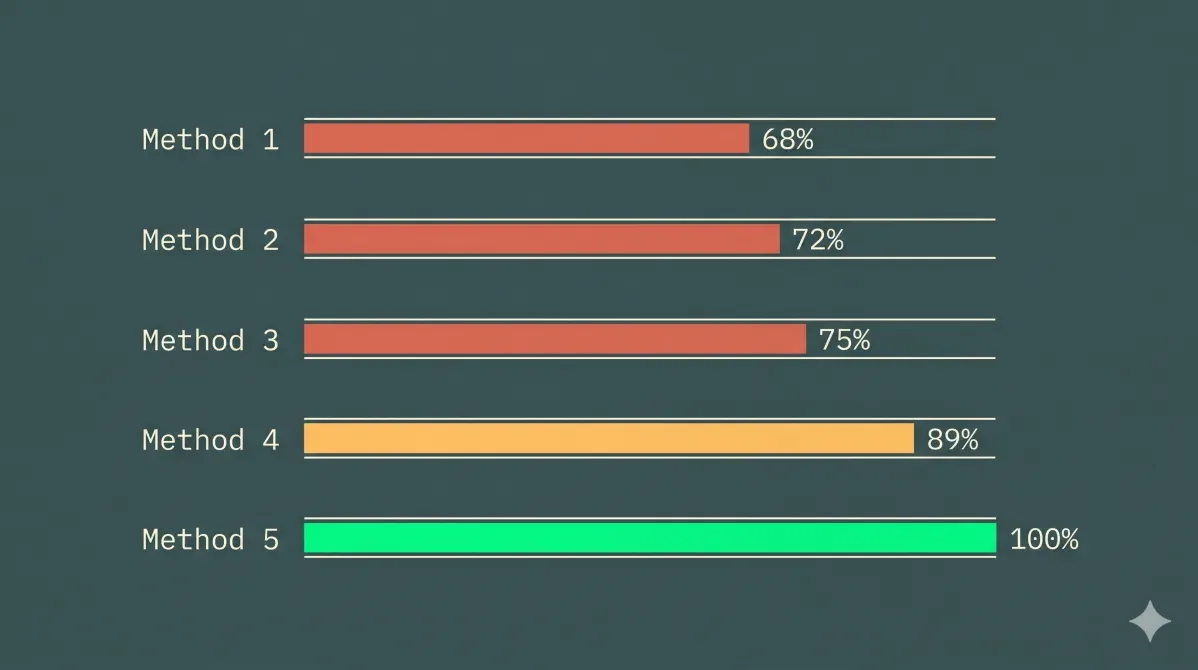
text.split(' ').length. Every junior JS dev has shipped this. It's wrong in at least three distinct ways.
This is a full breakdown of five approaches to word counting in JavaScript — what each one actually does under the hood, where it breaks, and which one you should use. Spoiler: it's Intl.Segmenter.
Why Word Counting Is Harder Than It Looks
Text feels simple. Words are separated by spaces, right? Except:
- Double spaces between sentences (
hello world→ split gives 3 tokens, not 2) - Non-breaking spaces (
- Tabs and newlines — valid whitespace that
split(' ')ignores - CJK text — Chinese, Japanese, Korean have no spaces between words at all
- Emoji — a family emoji (
👨👩👧👦) is 1 visible character but 11 UTF-16 code units, 6 Unicode code points, and 1 grapheme cluster - Contractions and hyphenation —
don't,state-of-the-art— should that be 1 word or 2?
Most counting bugs are invisible until a non-English user hits your app.
The 5 Methods
Method 1: text.split(' ').length — The Naive Split
function countWords(text) {
  return text.split(' ').length;
}
This is the first thing people write. It's wrong immediately.
countWords('hello  world')  // → 3 (extra empty string token)
countWords('hello\tworld')  // → 1 (tab not counted as separator)
countWords('')              // → 1 (empty string gives [''], not [])
Verdict: Don't ship this. Ever.
Method 2: text.trim().split(/\s+/).filter(Boolean).length — The Patched Split
function countWords(text) {
  return text.trim().split(/\s+/).filter(Boolean).length;
}
Much better. /\s+/ matches any sequence of whitespace — spaces, tabs, newlines, carriage returns. trim() handles leading/trailing whitespace. filter(Boolean) drops empty strings.
countWords('hello  world')     // → 2 ✓
countWords('hello\tworld')     // → 2 ✓
countWords('')                 // → 0 ✓
countWords('héllo wörld')      // → 2 ✓ (accent characters preserved)
Where it breaks: CJK text. '你好世界'.trim().split(/\s+/) returns ['你好世界'] — one token, not four words. Also counts punctuation-only tokens: if your input has -- --, you get 2 phantom "words."
Verdict: Fine for English-only tools. Broken for global audiences.
Method 3: (text.match(/\b\w+\b/g) || []).length — The Classic Regex
function countWords(text) {
  return (text.match(/\b\w+\b/g) || []).length;
}
You'll see this everywhere on Stack Overflow. The problem is \w.
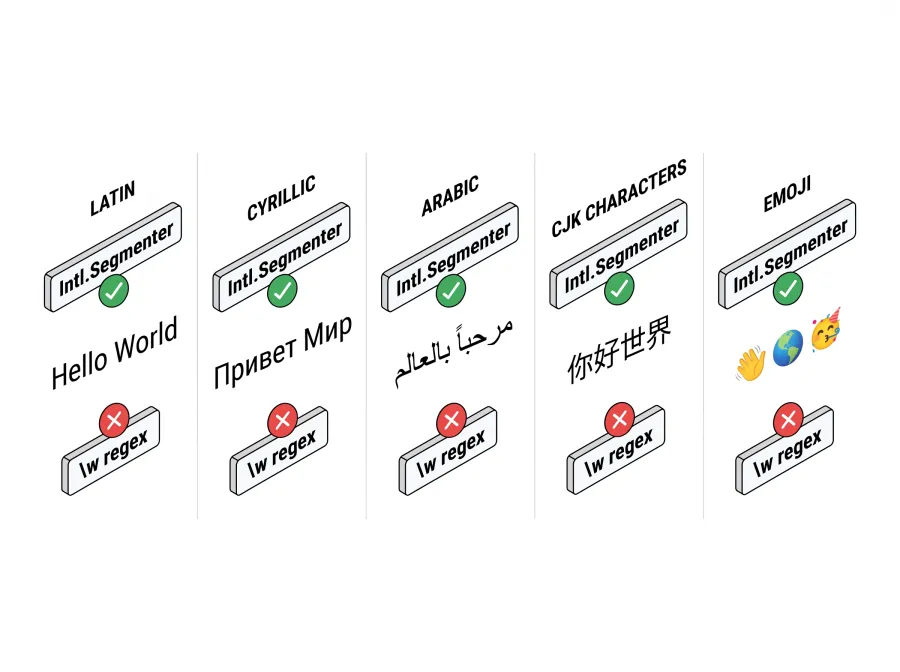
In JavaScript, \w is [A-Za-z0-9_]. That's the full set. Every character outside ASCII — Cyrillic (привет), Arabic (مرحبا), Greek (γεια), Korean (안녕) — is invisible to this regex. The || [] fallback is the tell: without it, .match() returns null on no matches, which would be the entire string for non-Latin text.
countWords('hello world')   // → 2 ✓
countWords('привет мир')    // → 0 ✗ (Cyrillic not matched)
countWords('héllo')         // → 1, but counts 'h llo' internally → actually still 1 but accented chars may be excluded
Verdict: Acceptable for dev tools that only process ASCII. Silent fail for everything else.
Method 4: (text.match(/\p{L}+/gu) || []).length — Unicode Property Escapes
function countWords(text) {
  return (text.match(/\p{L}+/gu) || []).length;
}
\p{L} is a Unicode Property Escape meaning "any Unicode letter." The u flag is required — without it, V8 throws a SyntaxError because \p isn't valid in non-Unicode mode. The g flag finds all matches globally.
countWords('hello world')      // → 2 ✓
countWords('привет мир')       // → 2 ✓ (Cyrillic works)
countWords('héllo wörld')      // → 2 ✓ (accented chars work)
countWords('你好 世界')         // → 2 ✓ (space-separated CJK)
countWords('你好世界')          // → 1 ✗ (no spaces, counts as one match)
Numbers and standalone punctuation are automatically excluded, which is usually what you want.
Verdict: Excellent for Latin, Cyrillic, Arabic, Greek, Hebrew, and space-separated CJK. Still can't segment CJK without whitespace.
Method 5: Intl.Segmenter — The Right Answer
function countWords(text) {
  const segmenter = new Intl.Segmenter('und', { granularity: 'word' });
  let count = 0;
  for (const { isWordLike } of segmenter.segment(text)) {
    if (isWordLike) count++;
  }
  return count;
}
Intl.Segmenter is a W3C Internationalization API available in all modern JavaScript runtimes (Baseline 2023). Pass 'und' as the locale for locale-independent segmentation, or your specific locale ('zh', 'ja') for language-aware rules.
The isWordLike flag is the key — it's true for actual words and false for spaces, punctuation, and separators. No filtering needed.
countWords('hello world')      // → 2 ✓
countWords('привет мир')       // → 2 ✓
countWords('你好世界')          // → 2 ✓ (你好 = hello, 世界 = world — dictionary segmentation)
countWords("don't stop")       // → 2 ✓ (contraction = 1 word)
countWords('state-of-the-art') // → 4 ✓ (hyphenated = 4 words, matches editorial convention)
countWords('')                 // → 0 ✓
Verdict: Use this. It's what browsers use internally for spell-check and text selection.
Node.js note: On Node.js 16+ with the default
full-icubuild,Intl.Segmenterworks out of the box. If you're on an older version or asmall-icubuild (common in some Docker images), you may getTypeError: Intl.Segmenter is not a constructor. Fix it by installing thefull-icupackage and passing--icu-data-dirat startup — or just upgrade to Node 18+, where full ICU data is bundled by default.
Accuracy Comparison Table
| Method | English | Accents | Cyrillic/Arabic | CJK (no spaces) | Empty string | Contraction |
|---|---|---|---|---|---|---|
split(' ') | ✗ (double spaces) | ✓ | ✓ | ✓ | ✗ (returns 1) | ✓ |
trim().split(/\s+/) | ✓ | ✓ | ✓ | ✗ | ✓ | ✓ |
/\b\w+\b/g | ✓ | ✗ | ✗ | ✗ | ✓ | ✓ |
/\p{L}+/gu | ✓ | ✓ | ✓ | ✗ | ✓ | ✓ |
Intl.Segmenter | ✓ | ✓ | ✓ | ✓ | ✓ | ✓ |
The Intl.Segmenter row is the only one with all checks.
Performance Considerations
For a 1,000-word document, all five methods are negligible — under 1ms on any modern machine. The difference shows at scale.
At 100,000 words (a full novel manuscript):
- Regex methods (
/\p{L}+/gu) run in ~20–40ms — fast enough for real-time counting oninputevents Intl.Segmenterruns in ~80–120ms — still sub-100ms, but getting close to the threshold for smooth 60fps UI
Rule of thumb: For inputs above 50,000 words, run the counter in a Web Worker. Pass the text via postMessage, run the segmenter in the worker context, and post the result back. The main thread stays unblocked.
// word-count.worker.js
self.onmessage = ({ data: text }) => {
  const segmenter = new Intl.Segmenter('und', { granularity: 'word' });
  let count = 0;
  for (const { isWordLike } of segmenter.segment(text)) {
    if (isWordLike) count++;
  }
  self.postMessage(count);
};
If you want to verify your implementation against a reference implementation, paste your text into our Word Counter — runs 100% in your browser, zero data sent to any server — and compare the count you get from your function against what it reports.
When to Use Each Method
| Use case | Recommended method |
|---|---|
| Quick English-only script | trim().split(/\s+/) |
| Production app, multi-language | /\p{L}+/gu |
| Production app + CJK support | Intl.Segmenter |
| Node.js CLI, any language | Intl.Segmenter (Node ≥16) |
| Legacy browsers (IE, old Safari) | trim().split(/\s+/) + polyfill note |
Real-World Edge Cases to Test
Before shipping a word counter, run it against these inputs. If any of them produce unexpected results, your method has a bug:
// 1. Multiple whitespace types
"hello\t\nworld" // expect: 2
// 2. Non-breaking space (pasted from Word)
"hello world" // expect: 2
// 3. Zero-width space (pasted from web)
"helloworld" // expect: 1 or 2 (debatable, document your choice)
// 4. Pure punctuation
"... --- ???" // expect: 0
// 5. Numbers only
"123 456" // expect: 0 (if counting "words" = letters only)
// expect: 2 (if counting tokens)
// 6. Mixed script
"hello мир" // expect: 2
// 7. Emoji in text
"Great job 🎉" // expect: 2 (emoji is not a word)
// 8. Hyphenated compound
"state-of-the-art design" // Intl.Segmenter → 5; /\p{L}+/gu → 5; split → 2
The hyphenated case is the one that trips people up the most. There's no universal "right" answer — English style guides disagree. Pick a behavior, document it, and be consistent.
The eight cases above are the minimum. If you want a broader corpus without hand-building one, the Dummy Data hub publishes the Unicode fixtures this kind of function actually breaks on: pangrams across 15 scripts, emoji with ZWJ-joined family clusters, invisible characters listed with their codepoints, Zalgo-stacked combining marks, and boundary-length ruler strings for off-by-one checks. Copy any block straight into a test file. It also generates exact-word-count prose at 50 / 100 / 250 / 500 / 1,000 words, which is what you want for asserting a counter's output against a known number rather than eyeballing it — those blocks are verified against the same countWords() implementation described below.
What the Word Counter on This Site Uses
The Word Counter on editlyapp.com uses Intl.Segmenter with /\p{L}+/gu as a fallback for environments where the API isn't yet available. The segmenter runs on the main thread for documents under 50,000 words and kicks to a Web Worker for larger inputs — keeping UI response under 16ms regardless of manuscript length.
This is the same approach described in the Readability Score Explained article, where sentence segmentation uses Intl.Segmenter with granularity: 'sentence' to feed the Flesch-Kincaid formula accurately.
If you're building a regex-based text tool and need to test patterns against real content, the Find & Replace tool on this site supports full regex with the u flag — useful for validating your /\p{L}+/gu patterns before wiring them into your app.
The Definitive Implementation
Here's the production-ready version that handles every case above:
/**
 * Count words in any language using Intl.Segmenter.
 * Falls back to Unicode regex for environments without Segmenter support.
 */
function countWords(text) {
  if (!text || !text.trim()) return 0;

  if (typeof Intl !== 'undefined' && Intl.Segmenter) {
    const segmenter = new Intl.Segmenter('und', { granularity: 'word' });
    let count = 0;
    for (const { isWordLike } of segmenter.segment(text)) {
      if (isWordLike) count++;
    }
    return count;
  }

  // Fallback: Unicode Property Escapes (all modern browsers, no IE)
  return (text.match(/\p{L}+/gu) || []).length;
}
Two things to notice. First, the early return on empty/whitespace-only input — Intl.Segmenter on an empty string returns zero segments, but the guard is explicit. Second, the feature check for Intl.Segmenter instead of a try/catch — cleaner and cheaper.
For a deeper look at how regex patterns behave on real text, the Regex Find & Replace Guide covers capture groups, quantifiers, and lookaheads — everything you need to build robust text-processing patterns beyond word counting.